Ask a question
Ask how to explain winter gaps in a new hardwood floor to a homeowner, short enough to text.
An answer you would have been comfortable writing. Check anything about local code.
When you use its answers more than you rewrite them.
Free guide · As of October 2026
A plain-language guide for owners and office teams
As of October 2026. The tools change often, and I will refresh this guide as they do.
Builders and friends keep asking me where to start with AI for their company. This guide is my answer. I run a building company and use these tools in our office every day.
It is based on Claude, which I prefer, in part because Anthropic is focused on business and enterprise customers. ChatGPT is very similar and also a great product. Nearly everything here carries over.
Read it in order the first time. It is current as of October 2026, but AI is changing fast and any of this could update, change or get easier at any point, so check back for updates.
Josh Rosenthal, Lock Ten Studio
Claude is an AI assistant you work with in plain English, by typing or by talking. You can use it in a web browser, in the desktop app on your computer or on your phone. The same Claude handles a quick question and real work on your files.
This guide is about business. The value is in getting work done: creating efficiencies, letting builders build and getting the paperwork out of the way.
Two breakthroughs made that real. First, these tools learned not only to read your files but to produce and change files on your computer, which made AI a work tool instead of an email editor. Second, Claude Code became usable by regular people, which let us build our own tools.
Three ideas carry the rest of this guide:
Sign up for Pro at claude.com ($20 a month; Plans and privacy explains why not the free plan). Before you put anything in, go to Settings, then Privacy, and turn off "Help improve Claude."
Then pick one real task from your week. Something real but low stakes:
Give it the one file that matters and tell it what you want, the way you would brief a new project coordinator.
The first answer will usually be technically fine. What it won't do yet is sound like you or look like your best work. Tell it so in plain words. "Too formal, our clients are our neighbors." "We always lead with the schedule, then the cost." Then ask again.
That loop (ask, read, correct, ask again) is the most important habit in this guide. It is how you give Claude your style, your taste and your perspective until the work reads like yours. Most people who give up on AI quit after the first answer.

Context is the whole game. On its own Claude is a generic tool. Access to your data and your context is what turns it into something built around your business, and each step below gives it a little more.
Trust runs both ways. It is also about trusting yourself and your own learning. As you get better at this, it becomes safer to hand over more data and try harder things, because you have done it before. Move up when the step you are on has earned it.
Ask how to explain winter gaps in a new hardwood floor to a homeowner, short enough to text.
An answer you would have been comfortable writing. Check anything about local code.
When you use its answers more than you rewrite them.
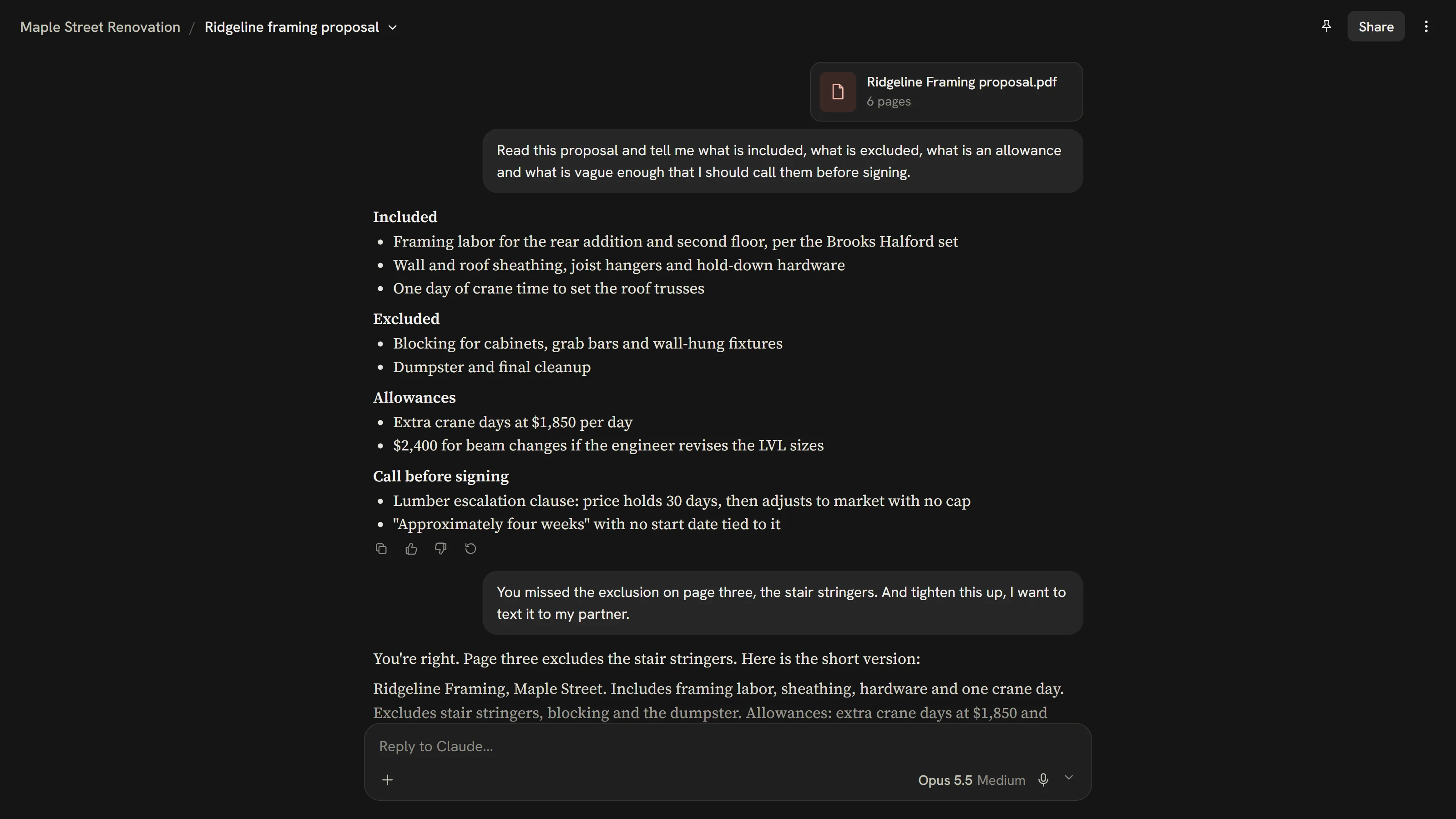
Attach a subcontractor proposal and ask what is included, excluded, carried as an allowance or unclear.
It finds what you would have found and points to where. Spot check two or three items.
When your spot checks keep coming back clean.
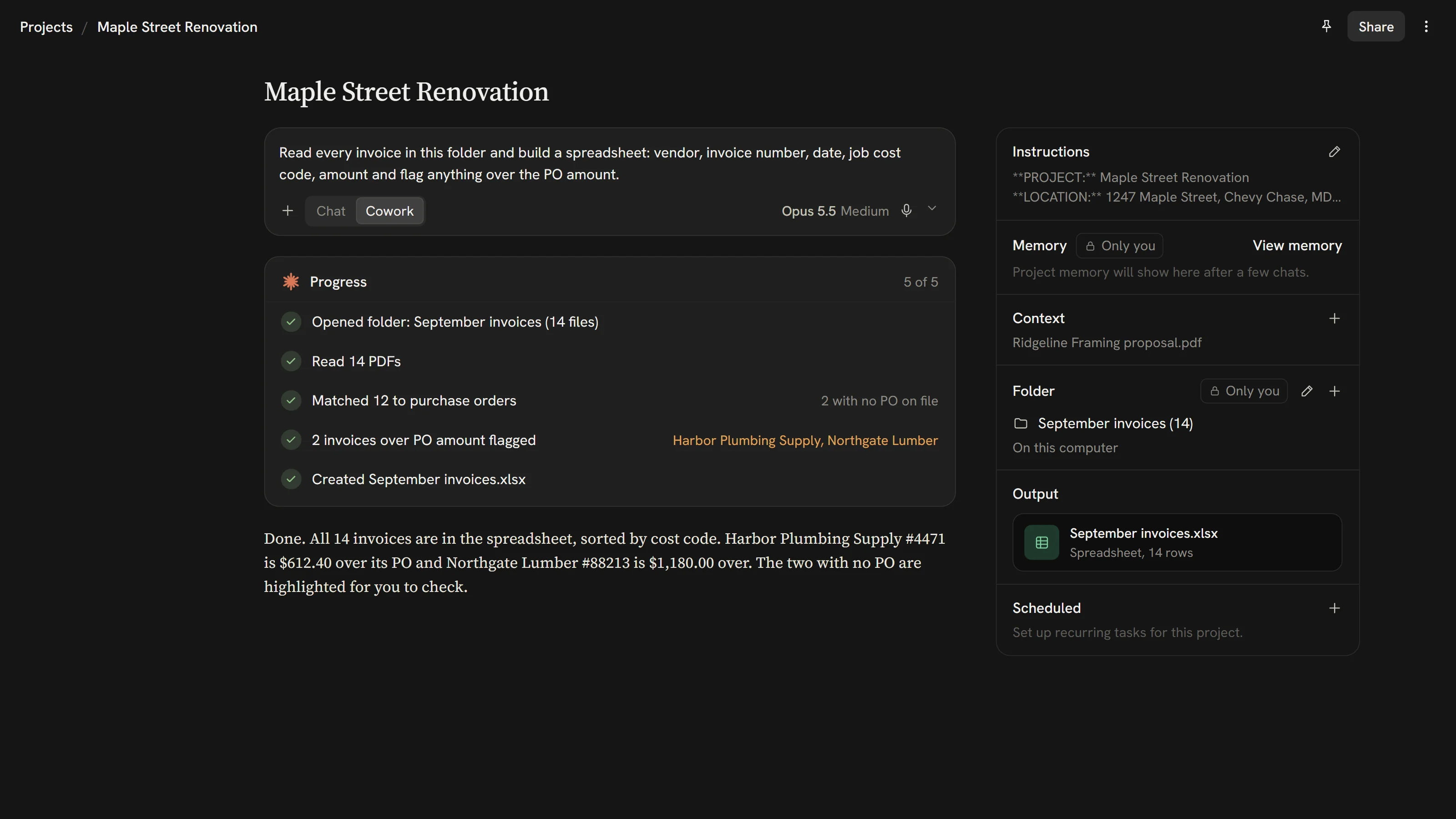
Give it three framing bids for one job and ask for a side by side spreadsheet with the questions to ask each bidder. Folder work is best in the desktop app (more below).
It shows where the bids are not apples to apples instead of just ranking by price. You check the totals.
When it reads across many files and stays careful with details.
Create a project for one job with the plans, specifications and your scope template, then ask for the tile sub's scope of work in your format.
It uses your format without reminders and flags what the plans don't specify instead of guessing.
When you stop re-explaining your company every conversation.
Give it a change order, the cost breakdown and the reason, and ask for a short letter to the client.
It reads like you and every number matches the source. You check it and send it yourself.
When your edits shrink to a few words.
Connect your email and ask what was agreed with the electrician about the panel upgrade.
It finds the right thread, does only what you asked and tells you what it did.
Whenever you want.
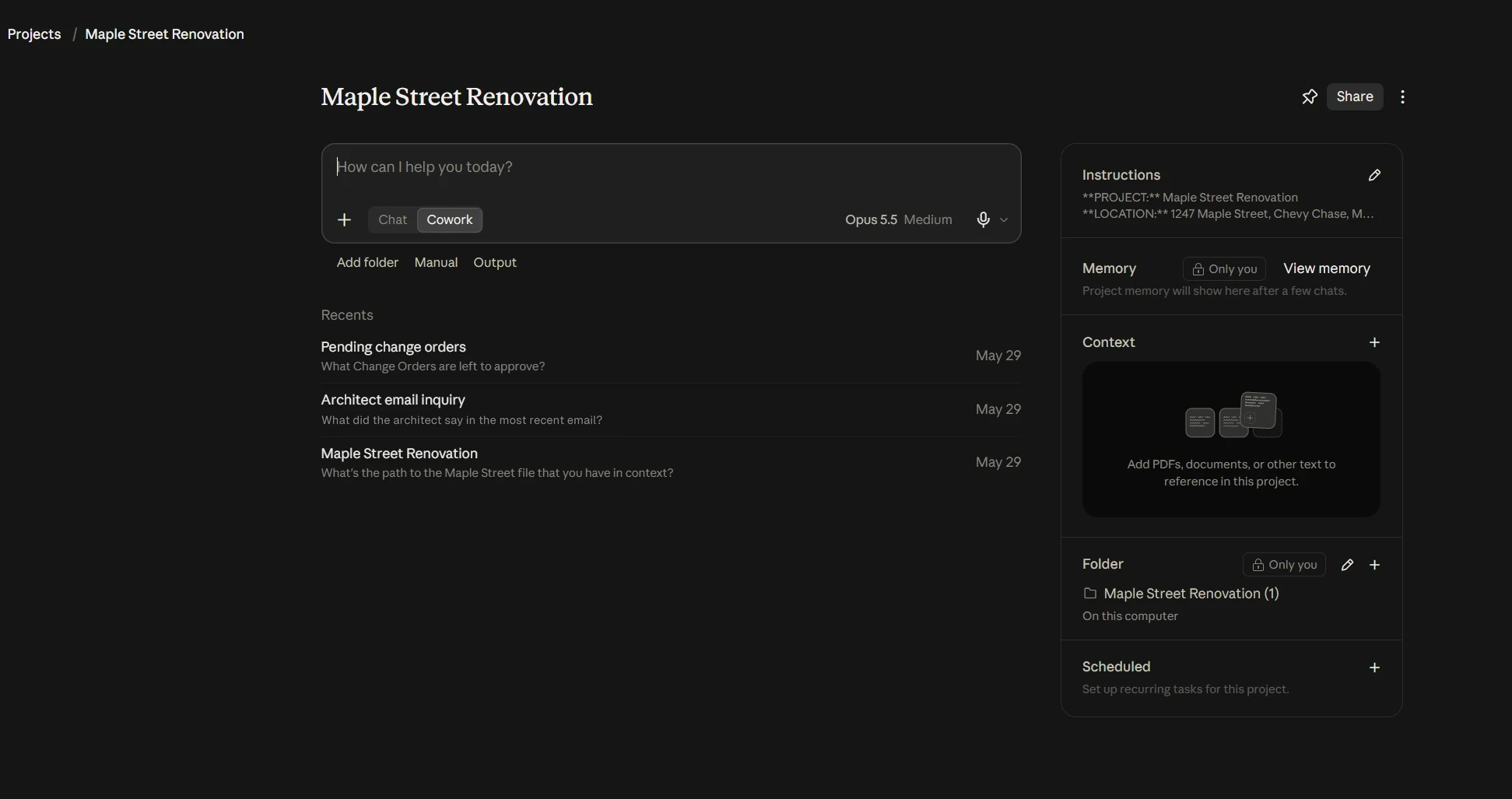
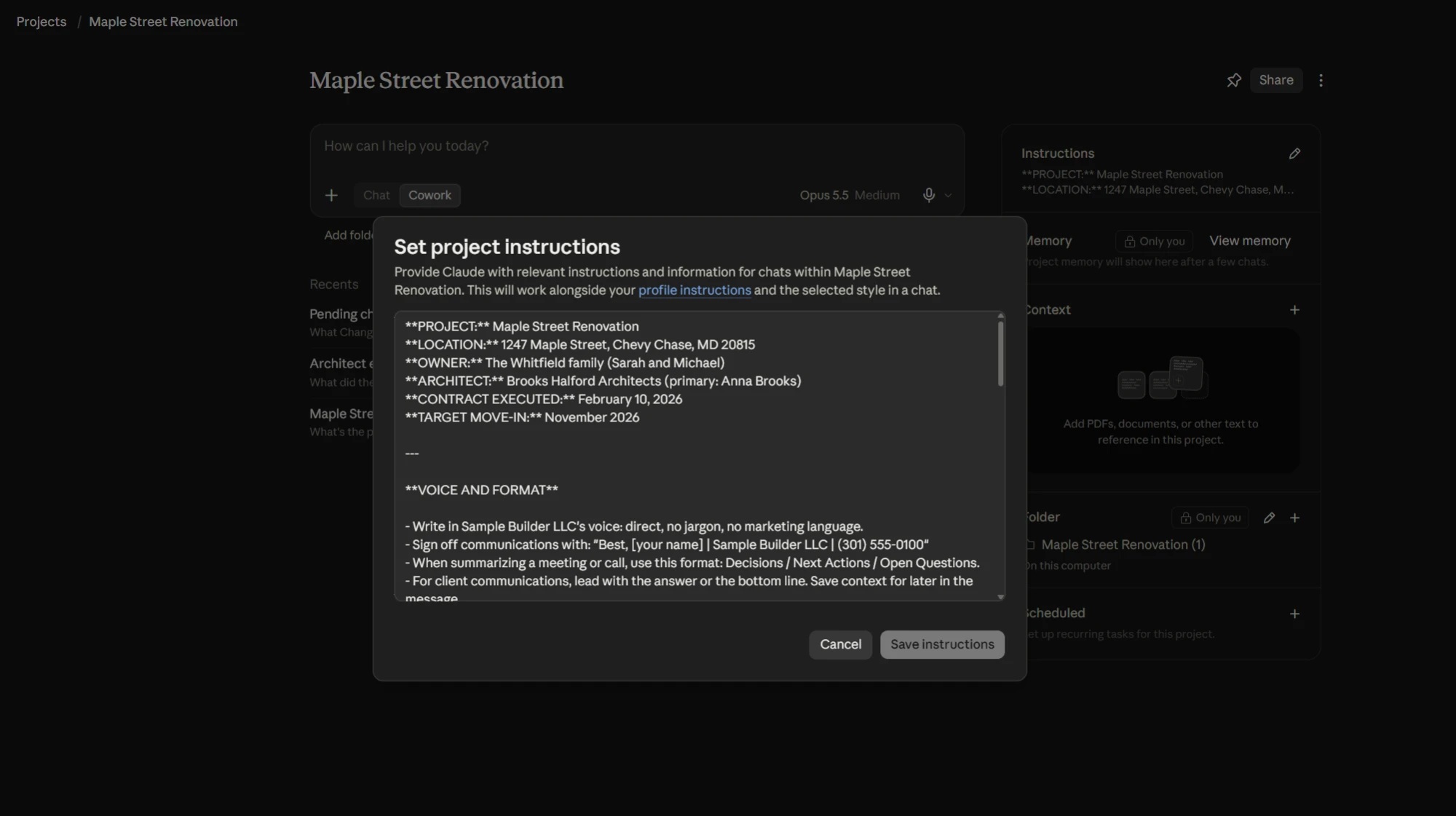
A project is a workspace for one area of your business. For a construction company, each job is its own project with its own instructions and its own files. On Team that project is shared (with view or edit access), so the whole office and Claude stay on the same page. Estimating and warranty make good projects for the recurring work.

Each project has standing instructions. Write them like a brief for a new hire:
Example instructionsWrite in our company voice: direct, plain, no jargon. Summarize meetings under three headings: decisions, next steps, open questions. Never invent numbers, dates or names. If something is not in the attached files, say so.

If you correct the same thing twice, it belongs in the instructions.
The desktop app is where Claude can work with folders on your computer: a set of plans, a month of subcontractor invoices, the closeout documents for a finished job.
It can also hand back real files: Word documents, Excel spreadsheets and slide decks you can open and edit.
A few habits to start with:

If you connect one thing, connect your email. For a contractor or small business owner, this is the single biggest jump in usefulness. With email connected you can ask:
Teach it your voice right away. Once your email is connected, ask Claude to read your sent mail and learn how you write. That is the fastest, cleanest way for it to pick up your voice, and the moment to do it is right when you connect. Save what it writes about your style into your project instructions so it sticks.
Gmail is read and search only, so Claude cannot send. It drafts and you send. Treat Outlook the same way.
Connections (Anthropic calls them connectors) fall into three groups.
Where the common builder tools stand as of October 2026:
Verisk XactRestore (restoration estimating) and Autodesk Fusion also have official connectors.
The rule: check your software provider's help pages for "Claude" or "MCP" (the technical name for these connections). More vendors are adding them every month, and when one exists the setup is a paste-in, not a technical project. Where there is none, exports, PDFs and email still get you most of the way.
A skill is a set of reusable instructions saved in a folder. Claude picks it up on its own when a task matches. Skills are on the paid plans, and on Team they can be shared with the whole company.
My method for making one:
A few we use in my office, all written this way: a bid comparison that lines up several proposals against one scope and lists the gaps, a trade scope of work generator that drafts a sub's scope from the plans and our template, a plan set comparison that reads two revisions and lists what changed, an invoice processor that checks a vendor invoice against the order before it is filed, delivery labels for materials headed to a job and a procedure writer that turns a recorded explanation into a written SOP.
The first one most offices would want is a change order memo in your own format: the header, the sections in order (what changed, why, cost, schedule effect, what you need from the client) and the rules (exact numbers, never rounded, plain and calm). After that, anyone in the office can say "write up change order 14 for the client" and get your format.
Prices as of October 2026. Check claude.com/pricing before you decide.
On Free, Pro and Max, your conversations can be used to train Anthropic's models unless you turn that off. On Pro, turn off "Help improve Claude" in Settings, Privacy the day you sign up. On Team and Enterprise, conversations are not used for training by default.
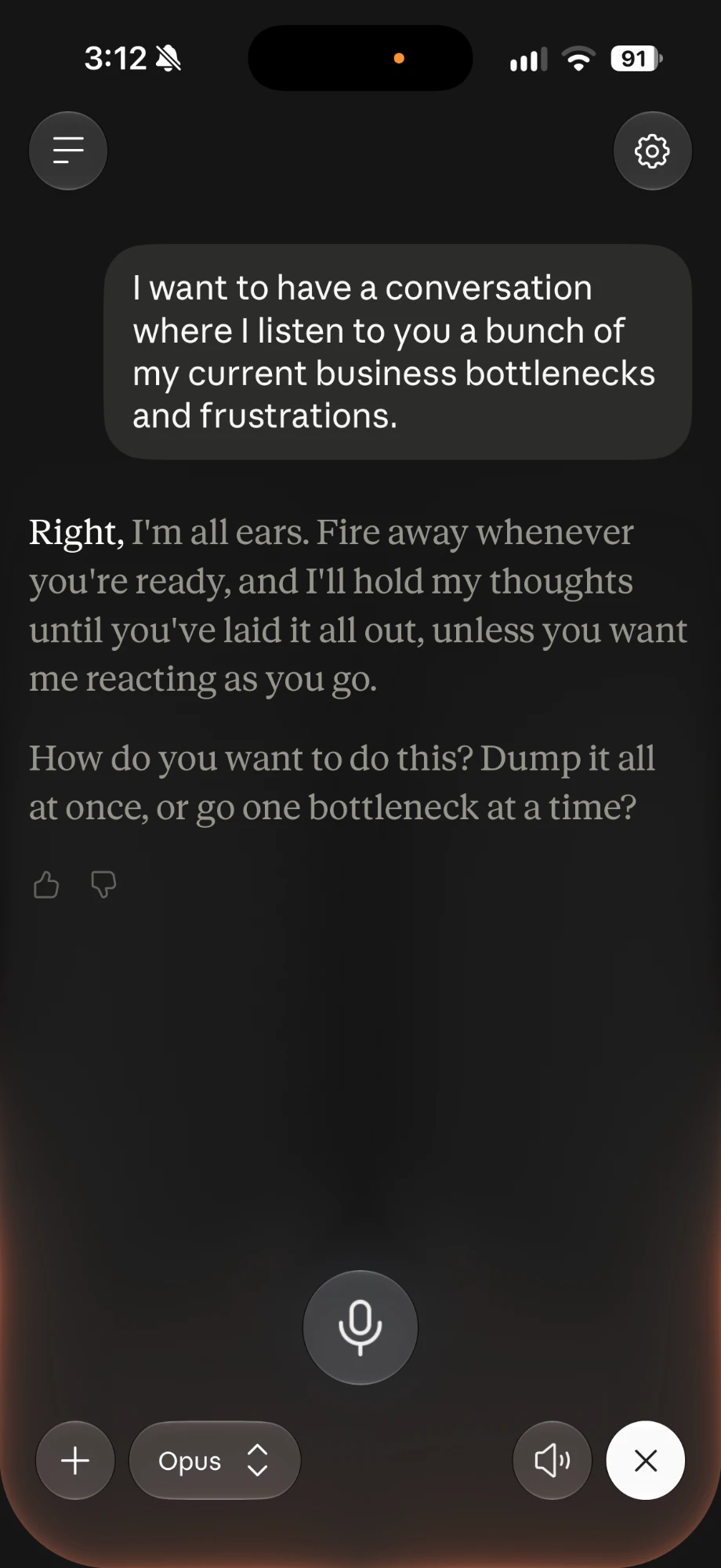
When you are ready for real system work (skills, custom tools), don't start at the keyboard. Start with a walk.
Go on a hike or somewhere quiet, open Claude on your phone and turn on voice mode. Voice mode is on every plan and works best on the phone. Then talk through every business problem, inefficiency, worry and wish you can think of. Don't organize it. Just get it out.
When you run dry, ask Claude which of those an AI is best suited to help with. You come away with a list. Then you start attacking the list.
That is how I started.

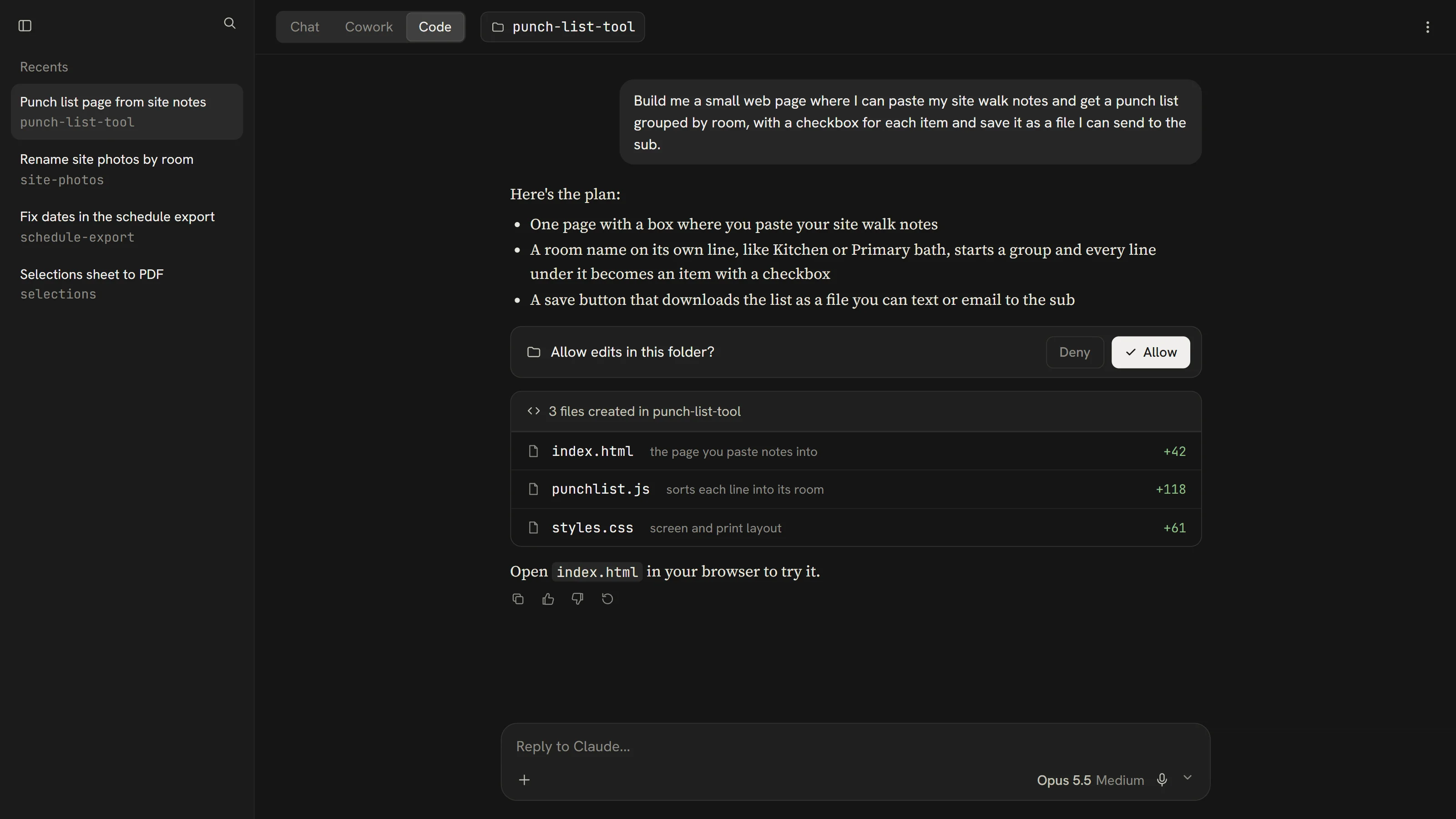
Claude Code is a way to write software and automate things by describing them in English. It has more access to your computer than regular Claude: it can create and change files in a folder, run programs and connect to other systems. That is what lets it build real tools, not just documents.
It lives in the Code tab of the desktop app. You don't need a terminal, and it requires a paid plan.

The biggest barrier to programming was always the language, not the ideas. Now you describe what you want in English and the code comes out the other side. It takes some learning and some time to get comfortable, but you do not need to be technical. It is the same habit as everything else here: describe, look, correct, go again.
I have built a number of custom workflows and programs this way. One of them is Walkthrough on the App Store, an app my crew uses to turn a site walk with photos and talking into a report.
| Term | What it means |
|---|---|
| Terminal | A text window where you type commands to your computer. |
| Directory or folder | The same thing. Programmers say directory. |
| Repository (repo) | The folder that holds a project's code and its history. |
| Git | The tool that keeps that history so you can see changes and undo them. |
| Commit | A saved snapshot of the project with a note about what changed. |
| Branch | A separate copy for trying something without touching the working version. |
| Code | The written instructions a computer follows. |
| Run | Start a program and let it do its work. |
| Deploy | Put your program where other people can use it. |
| API | A doorway one program offers so other programs can talk to it. |
| Environment variable | A setting kept outside the code, often a password or key. |
| Local vs cloud | Local means on your own computer. In Claude Code, cloud means Anthropic's computers running the work for you, not cloud storage like Dropbox. |
| Bug | Something in the program that doesn't work the way you meant. |
| Prompt | What you type to the AI. |
| Model | The AI itself, the engine behind Claude. |
| Token | A small piece of text. Usage and limits are counted in tokens. |
| Context | Everything the AI can see at once: your messages, files and instructions. |
A part two may follow with the tools, the stack and the harder ideas, if people want it.
The official resources are the most current source:
I don't agree with everything on these and I'm not tied to any of them.
If you have questions about your own situation, write to me at info@lockten.ai. Once you have tried some of this, I would like to hear what worked and what did not.